Blink cameras are cheap (you can snap 2 or 3 cameras for less than 50 bucks on sale at Amazon). They may not have the best quality in the world, but they get the job done. The problem is: Amazon keeps you in a subscription jail if you want to access your recordings. And well, according to Blink, or Amazon’s Terms of Service:
You give us all permissions we need to use your Blink Recordings to do so. These permissions include, for example, the rights to copy your Blink Recordings, modify your Blink Recordings to generate clips, use information about your Blink Recordings to organize them on your behalf, and review your Blink Recordings to provide technical support.
Yeahhhh not sure how I feel about that.
Luckily there’s a way around: You can buy a Blink Sync Module 2, store all your data locally and get rid of the cloud/subscription, right? Not quite.. 1) The subscription is still required for instant playback anywhere, 2) you are still locked into the Amazon/Blink ecosystem and pretty dependent on their closed app, 3) you don’t have a lot of control over the recordings and archiving, 4) sharing access with other users (spouse, child, friends) is a pain, and so on.
So why not own my own footage, decide what to do with it, reduce the blast radius if something goes wrong and have one less subscription? For about $25 in hardware (less than 3 months of Blink’s subscription), I could own the entire pipeline forever.
So, with an idea in my head and GitHub Copilot on my screen, I decided to quickly write a solution that would fit my needs and hopefully, others ;)
The result is Watchman: a Raspberry Pi Zero 2 W that pretends to be a USB drive for Blink Sync Module 2, captures motion clips, archives them locally, and serves everything from a simple web UI.
Repository:
https://github.com/renanfernandes/watchman
Table of Contents
- Prerequisites
- Why I Built This
- Architecture Overview - Nerd Talk
- How USB Gadget Mode Makes This Work
- Ingest Pipeline (Step by Step)
- Web Layer and Safety Checks
- Service Model and Operations
- Tradeoffs and Next Steps
Prerequisites
What You Need:
| Item | Approx. Cost |
|---|---|
| Raspberry Pi Zero 2 W | ~$15 |
| MicroSD card (16 GB+) | ~$5 |
| USB OTG data cable (Micro-USB to USB-A) | ~$5 |
| Blink Sync Module 2 | Already owned |
| Blink camera(s) | Already owned |
Total one-time cost: ~$25 vs. Blink subscription at ~$10/month (or $100/year).
The Pi pays for itself in under 3 months. After that, it’s free forever.
Why I Built This
So, I started with one simple goal: stop renting access to my own data.
I did not want a huge NVR stack or a full-blown solution like Unifi Protect. My setup is running several thousand miles from home and I wanted something cheap and reliable enough to just run.
This led to some requirements, like:
- Blink must always see valid USB storage
- Clips must be moved only after writes are finished
- Failures should recover automatically
- Browsing/downloading clips should be easy from the network. And if I want, expose it through a reverse proxy in the future.
The next sections will discuss what I implemented and how this was developed. Basically Nerd talk. Feel free to skip the whole Architecture and implementation discussion and head to my github repo to follow the setup instructions there and get this up and running: https://github.com/renanfernandes/watchman
Architecture Overview - Nerd Talk
KISS Principle should be the guide! With that in mind, all I need is a solution to 1) archive videos, 2) serve videos, so for this first release the architecture flow should be as simple as:
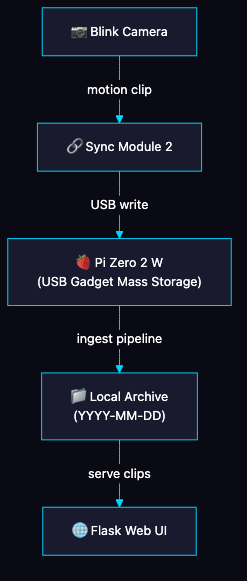
To achieve this and keep the simplicity, the control flow only uses two services:
watchman.py: The brain. Handles USB gadget load/unload, mounting, clip ingestion, watchdog reset logicweb.py: Read-only web interface for listing, streaming, and downloading archived clips
Supporting pieces:
watchman.conf: centralized config (paths, timing, ports)create_disk.sh: creates/formats the file-backed USB container - Used only during the setup processsetup.sh: host setup + boot config + service install - Used only during the setup processwatchman.serviceandwatchman-web.service: systemd service units
How USB Gadget Mode Makes This Work
On Pi Zero, the USB OTG port can run in gadget mode. That means the Pi can present itself as a USB device, not only as a host. For this, you need a few tweaks, such as enabling dwc2 and g_mass_storage.
dwc2in boot configg_mass_storageat runtime, pointing to a file container (default/ghostdrive.bin)
At runtime the module is loaded with parameters like:
modprobe g_mass_storage file=/ghostdrive.bin removable=1 ro=0 stall=0 \
    idVendor=0x0781 idProduct=0x5571 iManufacturer=GhostDrive iProduct=USB_Drive
Using a file-backed container keeps the setup simple: easy to size, easy to mount via loop device, and easy to recreate if needed.
Ingest Pipeline (Step by Step)
This is the core cycle in watchman.py:
- Unload gadget module so Blink is temporarily disconnected.
- Mount the container locally.
- Find all
.mp4files recursively. - Move clips to
ARCHIVE_DIR/YYYY-MM-DD. - Handle filename collisions (
clip.mp4,clip_1.mp4, etc.). - Unmount container.
- Reload gadget module so Blink can continue writing.
Timing controls from config are important here, they prevent collisions and try to minimize the amount of connects/disconnects:
SETTLE_TIME: wait after writes settle before cyclingMIN_INTERVAL: avoid ingest thrashingWATCHDOG_THRESHOLD: number of failures before USB reset path
When watchdog threshold is reached, Watchman does a full reset: unload gadget, toggle dwc2, reload gadget.
You may ask: Why are you disconnecting the module so frequently? Well, if you have a better solution, let me know. But the reason behind this was simply to avoid a situation where Blink is writing on the device while the script is making an operation. You may need to tweak the timing according to your needs.
Web Layer and Safety Checks
The Flask app is intentionally straightforward:
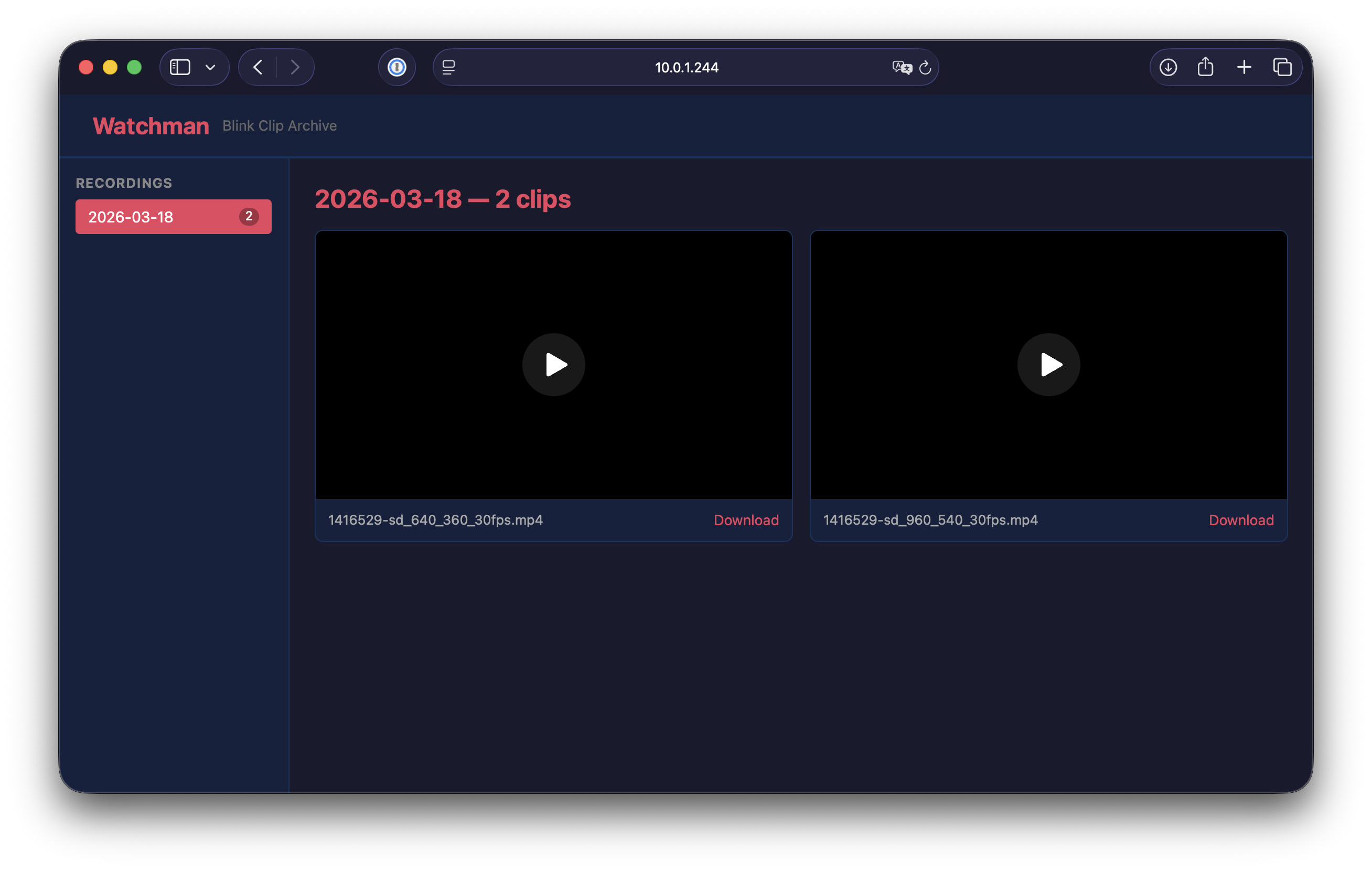
/shows available recording dates/date/<date>lists videos for a date/video/<date>/<filename>streams mp4/download/<date>/<filename>downloads mp4
I added basic but important protections:
- strict date pattern checks
- filename traversal filtering
- resolved path checks to ensure access stays inside archive root
It is built for trusted LAN usage, not as a fully hardened internet-facing media platform. I might put it behind a reverse proxy in the future. Who knows.
If you want to learn about implementing your own reverse proxy with Caddy with Entra ID, check out Protecting Home Assistant with Caddy and Microsoft Entra ID post.
Service Model and Operations
Both components run as systemd services and autostart on boot. That gives you:
- automatic restart on failure
- simple status checks
- centralized logs in journald
Typical troubleshooting commands:
journalctl -u watchman -f
journalctl -u watchman-web -f
Tradeoffs and Next Steps
I know the solution is not perfect, but for a few hours of design and vibe coding, I’m fine with the tradeoffs like:
- single-node local archive
- LAN-focused security model
- lightweight indexing only
For a next release, I’ll definitely add some extensibility like
- off-device replication (NAS/object storage)
- retention/cleanup policies
- Home Assistant integration - Yes I want to watch the recording on my Home Assistant Dashboard
- basic health endpoint + metrics
Are there any other features/capabilities you’d like to see incorporated? let me know or better yet, contribute to the project!
This project removed one more recurring subscription from my life.
At the end of the day, if a service gives me clear value, I will pay. If it charges rent on my own data, or the provider is not aligned with my values, I would rather build.
Resist and unsubscribe.